Tap for Escape
Tap Caps Lock on its own and it sends Escape, for leaving insert mode or closing dialogs.
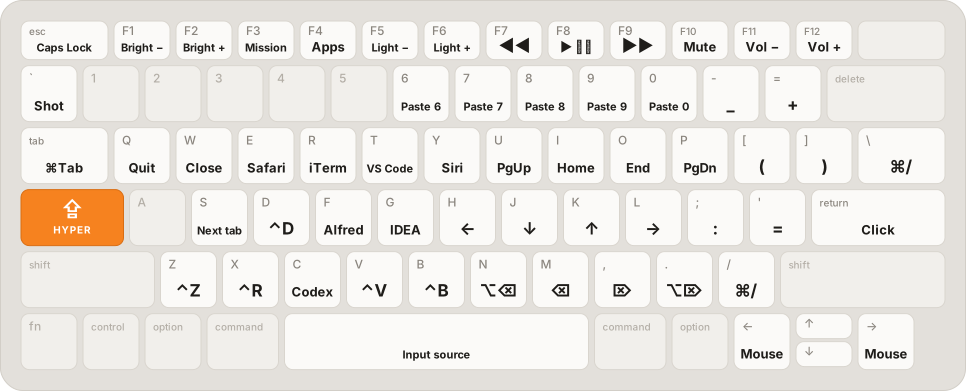
Tap it for Escape. Hold it for Hyper. Add ⌘ ⌥ ⌃ ⇧ to reach sixteen control planes for the cursor, editing, windows, apps and the mouse, without leaving the home row.
Native macOS app · macOS 14 or later · Apple silicon and Intel · 0.4.0 release candidate
One key, three jobs
Tap Caps Lock on its own and it sends Escape, for leaving insert mode or closing dialogs.
Hold it and the keys under your hands become actions. H J K L move the cursor in every app.
Add Command to select, Option to move the mouse, Control for Spaces. Sixteen planes in all.
What you get
◇ Nothing to configure before it works
The layout that ran on Karabiner-Elements for years, now built into a native app.
H J K L   ← ↓ ↑ →
U I O P   Page Up · Home · End · Page Down
N M , .   delete word · char · next char · next word
⌘ H / L   select left / right
⌥ H J K L move the mouse
6 7 8 9 0 paste clipboard slot
✓ 357 bindings across 16 planes
◇ No JSON, no restart
Shell commands run only after you approve them, and imported ones arrive switched off.
# in Terminal, ⇪ N sends ⌃W instead
bindings:
- when:
  - type: frontmost_app
    include: [com.apple.Terminal]
  action:
    kind: key_combo
    target_key: 87     # W
    with_ctrl: true
◇ Nobody memorizes 357 bindings up front
Free Play shows the last key and what it did. Nothing you type is recorded.
◇ It changes only the key mapping it owns
Diagnostics explains every failed check and fixes most of them with one button.
# quit Capslock first
$ /Applications/Capslock.app/Contents/MacOS/Capslock \
    --restore-original-caps-lock
✓ pre-session key mapping restored
In numbers
Questions
No. Capslock builds the layout in. Karabiner-Elements can keep running for other keys, as long as none of its rules uses Caps Lock or F18.
No. Keys are handled in memory on your Mac. Capslock has no analytics and sends nothing anywhere; the Statistics page keeps only counts.
Yes. Hold Caps Lock and press Escape to turn real Caps Lock on or off.
Capslock 0.4.0 is a release candidate. A signed, notarized download will appear on the Download page once it passes final acceptance.
Start with the layout you will use every day.Read how Capslock installs, then keep the layout open while you learn it.